Grad School in 2024
5/8/20243 min read
Grad School Survival 101:
Time, Tech, and the Magic of the Apple Pencil
Grad school in counseling is… a lot. Between practicum hours, discussion posts, research papers, and trying to maintain a semi-human social life, time management can feel like juggling with flaming torches — while your calendar laughs at you. When I started my counseling program, I thought I was organized. Then week two hit, and suddenly I was drowning in readings about developmental theory and ethics codes, armed only with a paper planner and a highlighter that had seen better days.
Everything changed when I started using a few simple tools — and yes, my beloved iPad and Apple Pencil became my secret weapons. Paired with the right apps, they turned grad school chaos into something almost manageable. I committed myself to digital note-taking from the beginning. It was a tough transition from a paper-and-pencil princess, like myself- but here we are, living the digital dream! My notes are searchable, organized, and right at my fingertips! I don't have to carry around or find multiple notebooks. 5/5 stars. ⭐️
The Art of Time Management (and Staying Sane)
My biggest time management rule: plan your week like a counselor, not a perfectionist. Every Sunday, I sit down with my weekly planner like this one and block out the week ahead. Then I transfer deadlines and practicum hours into Google Calendar, which syncs perfectly across my devices. I color-code everything — blue for classes, green for self-care, red for “don’t even think about skipping this.”
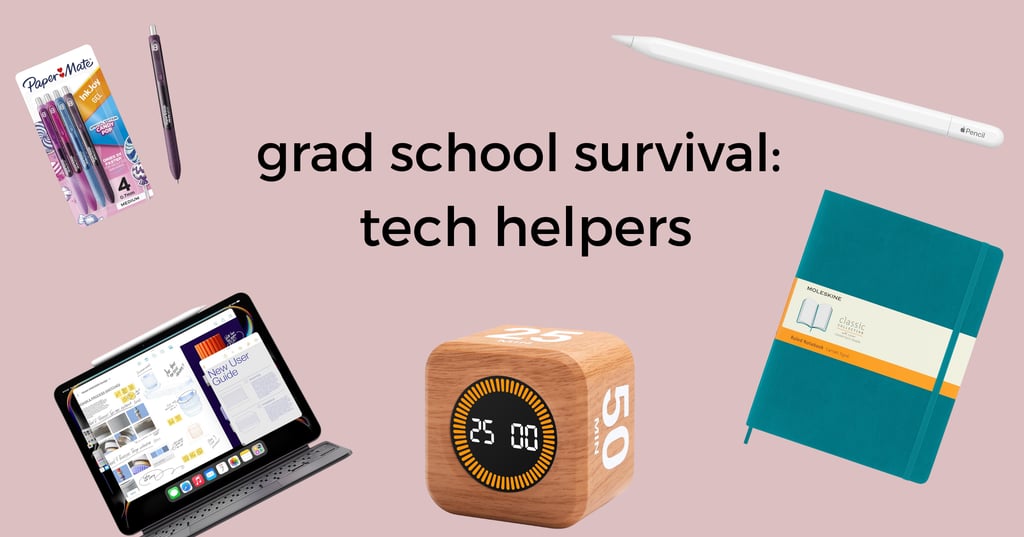
For focus, I swear by the Pomodoro method — 25 minutes of deep work, 5 minutes off. I use the Forest app for this (your study session grows a virtual tree, and if you leave early, the tree dies — oddly motivating). If you prefer something more visual, try a TimeCube Timer or a TickTime Pomodoro Clock for your desk. Having a physical reminder keeps me honest about breaks.
And if you’re juggling family life, internship hours, or multiple jobs, the Amazon Echo Dot is surprisingly handy — just say, “Alexa, remind me to log counseling hours at 7 p.m.,” and let the tech do the remembering for you. Put those robots to work!
Study Tools That Actually Work
When you’re deep in theories of human development or ethics standards, having the right digital tools can be a game-changer. My top picks:
Notion – my all-in-one hub for tracking assignments, readings, and practicum reflections.
GoodNotes 6 – I use it daily with my Apple Pencil Pro to handwrite notes, annotate PDFs, and color-code everything.
Quizlet Plus – great for memorizing key terms and test prep (especially for the NCE or CPCE later).
Google Drive – still undefeated for collaborating on group projects.
Anker PowerCore Portable Charger – because your iPad will die during class someday, and this will save you.
And if you’re more of a visual learner, the reMarkable 2 Tablet is worth looking into. It’s distraction-free and feels like writing on paper — no notifications, no temptations, just pure focus.
The Digital Notebook Revolution: iPad + Apple Pencil
The iPad Pro has been my grad school lifeline. It’s light, fast, and works beautifully with the Apple Pencil — a must for anyone who prefers handwriting but wants digital organization. I use GoodNotes to write lecture notes, draw counseling models, and annotate slides, then back everything up to iCloud for peace of mind.
Split-screen mode lets me keep readings on one side and notes on the other, and I’ve started using Paperlike screen protectors so writing feels natural. I even splurged on a Logitech Combo Touch Keyboard Case — it’s less expensive than Apple’s Magic Keyboard and just as functional for typing up papers.
Finding Balance in the Digital Age
All the apps and gadgets in the world won’t help if you don’t give yourself rest. I’ve started using a Hatch Restore to wind down — it dims the lights gradually, plays soft sounds, and helps me avoid that post-study phone scroll. For journaling, I love these Moleskine Journals because they feel so luxurious, and sometimes you just need a pen-to-paper feel. These Paper-Mate Inkjoy pens in the candy pop colors are also my absolute favorite- so smooth, and the colors are so chill!
Tech is supposed to make life easier, not busier. Find your rhythm, keep your tools intentional, and remember — balance is productivity, too. So plug in your iPad, close your tabs, and take that well-earned break. You’re doing great — one note, one breath, one focused session at a time. ✨